Can you play Lullwood on a phone?
Yes, Lullwood plays on a phone, free in the browser, with no keyboard needed: every action has an on-screen control. Hold the phone in landscape, because portrait shows only a rotate prompt. The limit: two emergency prompts are tap rows that short phone screens can hide.
How do you hold the phone?
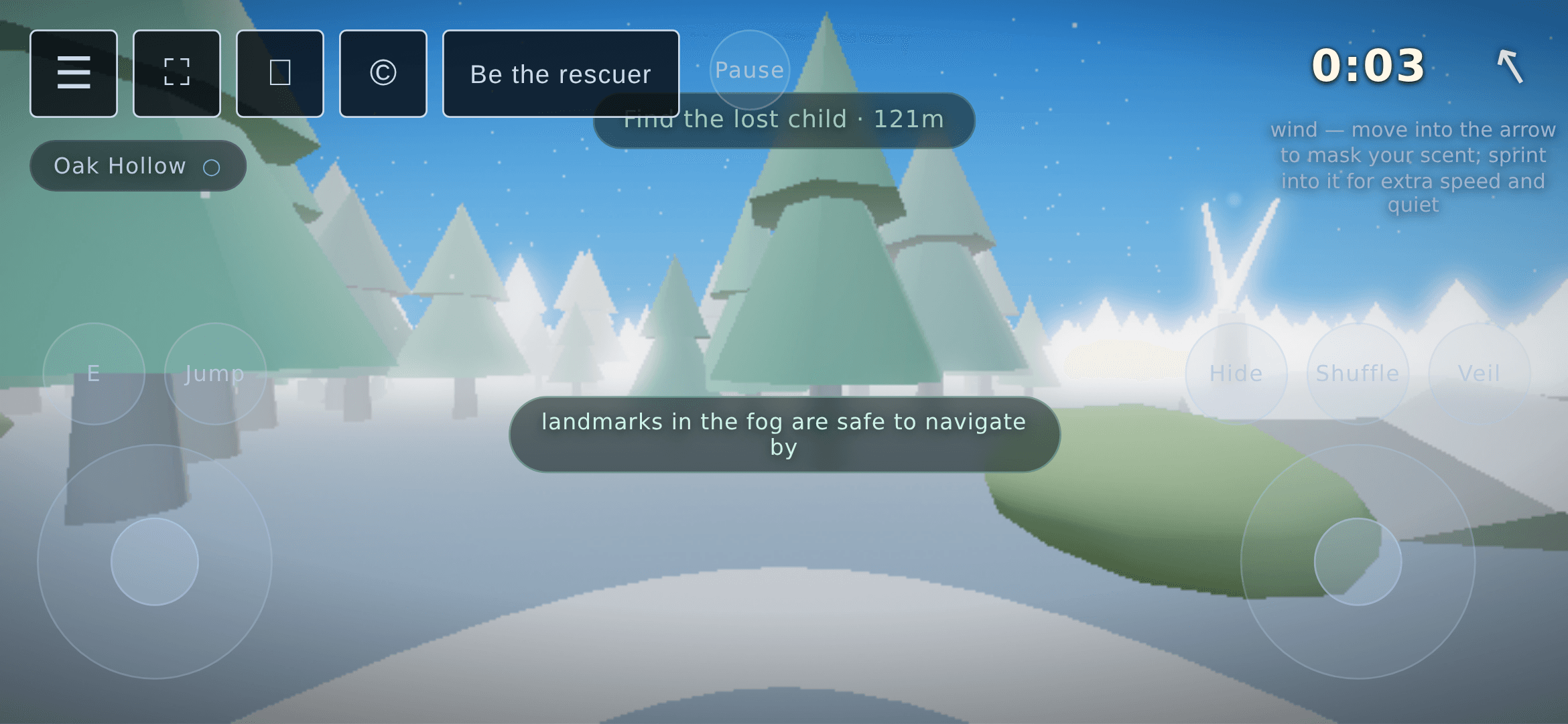
Sideways. Lullwood is a first-person game and a portrait screen crops too much of the forest, so on a phone held upright the game covers the screen with a rotate prompt (“Rotate your device to play”) until you turn it. Touch devices also get a wider camera, 85 degrees of vertical view against 70 on desktop, so a small screen shows more of the fog.
The game picks touch controls when your device has no mouse-style pointer, or when the window is 768 pixels wide or narrower. A tablet with a touchscreen gets the same controls as a phone.
What are the on-screen controls in Lullwood?
Every one of these rendered on the live site in a phone-sized landscape window. We tapped E to pick up a stone and to lift the child, and both worked.
- Left stick: move. Push it past about three quarters of its travel to run.
- Right stick: look around. It turns the camera at a rate while you hold it, so a held stick keeps turning.
- E (bottom left): the desktop E key. It lifts the child, picks up a stone, buys a veil charm and starts a chapel sanctuary, whichever is in reach.
- Jump (bottom left): the space bar. Jump is how you clear a charging wolf or lion.
- Hide (bottom right): the H key. It only works at the one kind of hiding spot, bramble, same as desktop. When you stand next to one the game prints “Tap Hide to slip into the bramble”.
- Shuffle: the R key. While you are hidden it nudges you a short step, about one unit, in the direction you are moving or facing, and it has a two-second cooldown.
- Veil: the F key, but you hold the button instead of the key. It is the mist veil, which cuts how far predators can see you.
- Pause (top, next to the menu buttons): the Esc key. Tapping it again resumes, which Esc cannot do.
- Run (beside Jump): only appears if you turn on the toggle-run setting.
Which actions are tap rows, not buttons?
Four actions have no permanent button. They appear as a line of text at the top of the screen when they apply, and you tap the line.
- Throw: after you pick up a stone with E, a Throw button joins the E and Jump row and the prompt reads “Holding a stone, tap Throw”.
- Climb: next to a vantage rock the game shows “Press C to climb the rock” with a Climb chip. Tap the row. The line still says C, which a phone has no key for, but the tap works.
- Burn the veil (Q on desktop): during a chase the row “Burn veil for a detection-proof escape” appears, and tapping it uses it.
- Break the scent trail (G on desktop): when a predator is following your scent, a row offers to break the trail. Tapping it costs stamina, and the row greys out when you have too little.
When a charging predator gives you a short window to dodge, the Jump prompt at the top is tappable too, in addition to the Jump button.
What does not work as well on a phone?
- Landscape only. There is no portrait layout.
- Short screens hide the emergency rows. The game has one text slot at the top of the screen, and on a landscape screen 420 pixels tall or less (a Pixel 5 is 393) it drops the lower-priority rows when a higher one is showing. In a chase with no cover nearby, the line “nowhere to hide, hold Veil” is showing, so the burn-the-veil row is hidden, and the same rule hides the scent-trail row. We saw the burn-the-veil row hidden at 851 by 393, and showing and responding to a tap at 932 by 430. On a short screen, the Veil button is what you have.
- Some firefly clusters are not drawn. A phone renders four of the six, and the unrendered ones still make predators see you farther. The firefly guide has the detail.
- We tested an emulated phone, not a physical one. Everything above was checked in a desktop browser pretending to be a Pixel 5, on October 29, 2026. We have not measured frame rate or touch feel on real devices, so we cannot tell you how it runs on yours. Of the tap rows, we staged and saw the throw, climb and burn-the-veil rows; the scent-trail row and the tappable dodge prompt are wired the same way in the code, but we did not stage them.
Can you win Lullwood on a phone?
Yes. The win is the same as on desktop: reach the lost child, then tap E. We staged that on the live site in the phone emulation, and the win screen came up. The how to win Lullwood guide covers what happens after the lift, and the how to survive Lullwood guide covers the wolves, bears and lions on the way there. If it feels too hard on a small screen, Lantern is the gentlest difficulty tier.
Questions about playing Lullwood on a phone
Does Lullwood work in portrait mode on a phone?
No. Lullwood only plays in landscape. If you hold the phone upright, the game shows a full-screen rotate prompt that reads "Rotate your device to play" until you turn the phone on its side.
Do you need a keyboard to play Lullwood on a phone?
No. Every desktop key has an on-screen counterpart: two sticks for movement and look, buttons for E, Jump, Hide, Shuffle, Veil and Pause, and tappable prompt rows for the vantage-rock climb, the stone throw, the emergency veil burn and the scent-trail break.
How do you sprint in Lullwood on a phone?
Push the left stick most of the way to its edge, past about three quarters of its travel, and you run. If you turn on the toggle-run setting, a Run button appears next to Jump and the stick no longer needs to be held that far.
Can you win Lullwood on a phone?
Yes. The win is the same as on desktop: reach the lost child and tap the E button to lift her. We played that through on the live site in a Pixel 5 landscape emulation and the win screen came up.